-
Documentation for EAS
-
Documentation for EASE
-
- Review
- Chained Quizzes
- Quiz Result
- Quiz Access
- Quiz Templates
- Duplicating a Quiz
- Deleting a Quiz
- Previewing a Quiz
- Editing a Quiz
- Adding a Quiz
- Manage Quizzes
- Quiz Basics
Questions are created in the Question Bank of a quiz.
Go to EAS > Quizzes > Questions and click Create New Question.
Select the required Question Type and enter the question text.
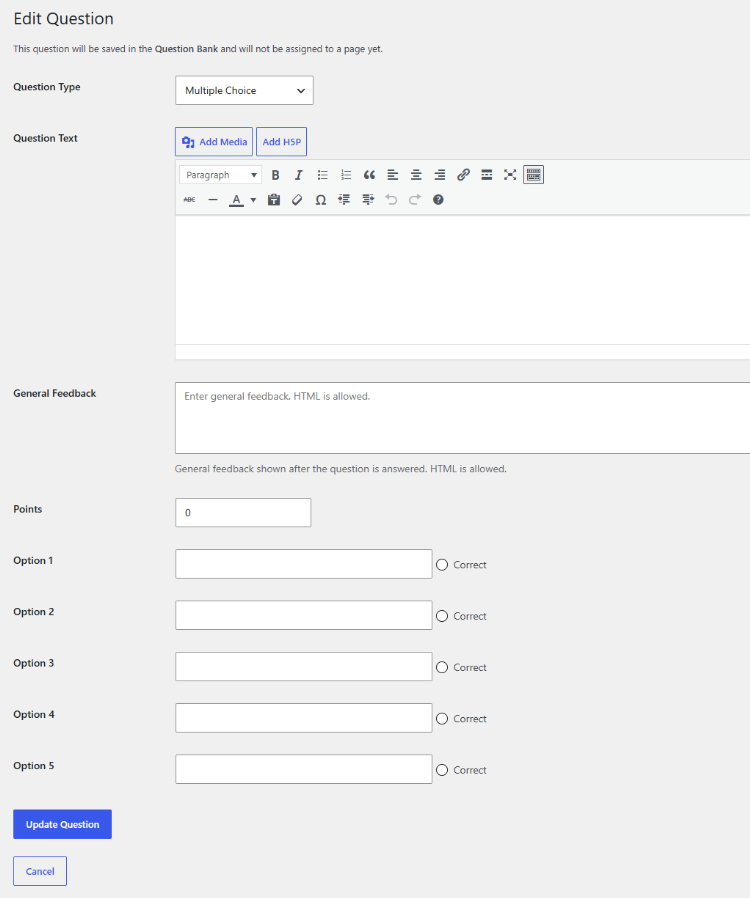
Depending on the question type, additional information may be required, such as answer options, correct answers, feedback, or recording settings.
For questions that are graded, enter the number of Points assigned to the question. Description questions do not have points because they provide information rather than require a student response.
EAS supports the following question types:
- Multiple Choice
- Drag and Drop into Text
- Fill in the Blanks (C-Test)
- Description
- Essay
- Audio Response
General feedback can be entered for a question. Feedback can contain HTML and can be displayed after the question has been answered.
After entering all required information, click Save Question.
A question created in the Question Bank is not automatically assigned to a page. Use Add Existing Question from a page’s Questions screen to place it on a page.